Question:
How do I charge the Laser RGB Party Speaker and wireless microphone?
Answer:
Model reference: SP-RG60BK-032
Applies to: SP-RG60BK-032
If your SKU differs, search our support page by your Model SKU to find the correct article.
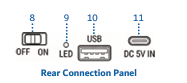
Use the supplied USB-A to USB-C charging cable with a suitable 5 V USB-A power source.
Suitable charging sources include:
- Laptop or PC USB port
- Power bank
- Car charger
- Certified wall charger
Speaker charging details:
- Speaker charging port: USB-C
- Speaker charging input: 5 V 1 A
- Speaker charging time: Approx. 5 hours
Microphone charging details:
- Microphone charging port: USB-C
- Microphone charging input: 5 V 500 mA
- Microphone charging time: Approx. 2 hours
Fully charge the speaker before first use.
Was this article helpful?
That’s Great!
Thank you for your feedback
Sorry! We couldn't be helpful
Thank you for your feedback
Feedback sent
We appreciate your effort and will try to fix the article