Description:
Question: How do I set up my tablet for the first time?
Answer:
Model reference: O-P11A
Applies to: O-P11A
If your SKU differs, search our support page by your Model SKU to find the correct article.
To set up your Laser 11-inch Android Tablet with Keyboard and Mouse:
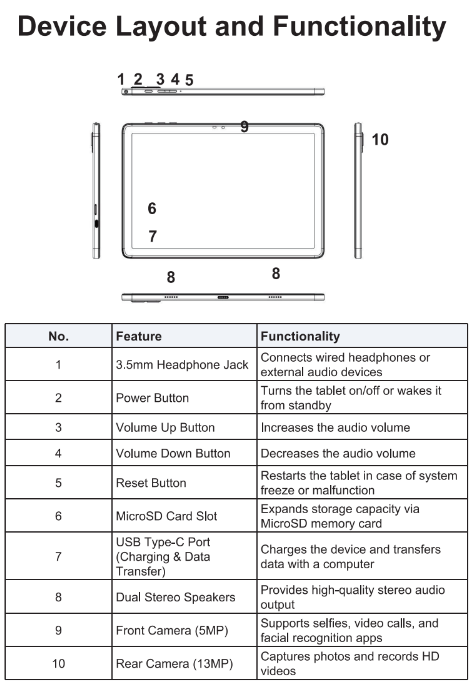
1. Hold the power button for 2 to 3 seconds until the screen lights up.
2. Choose your language on the welcome screen.
3. Select your Wi-Fi network and enter its password.
4. Sign in to your Google account for access to Google Play, or skip this step and sign in later.
5. Follow the remaining prompts until the home screen appears.
Was this article helpful?
That’s Great!
Thank you for your feedback
Sorry! We couldn't be helpful
Thank you for your feedback
Feedback sent
We appreciate your effort and will try to fix the article