Question: How do I use the multimedia and shortcut keys?
Answer:
Model reference: KB-MB26BK-681 / KB-MB26WH-698
Applies to: KB-MB26BK-681, KB-MB26WH-698
If your SKU differs, search our support page by your Model SKU to find the correct article.
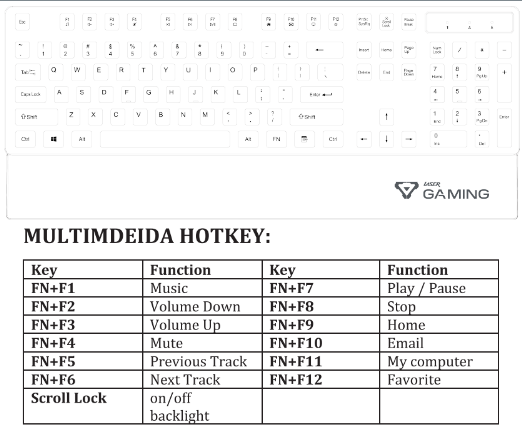
Hold FN and press the relevant function key on the Laser Gaming Full Size Gaming Keyboard with RGB Backlight:
- FN + F1: Music
- FN + F2: Volume down
- FN + F3: Volume up
- FN + F4: Mute
- FN + F5: Previous track
- FN + F6: Next track
- FN + F7: Play or pause
- FN + F8: Stop
- FN + F9: Home
- FN + F10: Email
- FN + F11: My computer
- FN + F12: Favourite
For example, hold FN and press F2 to lower the volume, or FN and F7 to play or pause.
Was this article helpful?
That’s Great!
Thank you for your feedback
Sorry! We couldn't be helpful
Thank you for your feedback
Feedback sent
We appreciate your effort and will try to fix the article