Question: How do I turn the keyboard backlight on or off?
Answer:
Model reference: KB-MB26BK-681 / KB-MB26WH-698
Applies to: KB-MB26BK-681, KB-MB26WH-698
If your SKU differs, search our support page by your Model SKU to find the correct article.
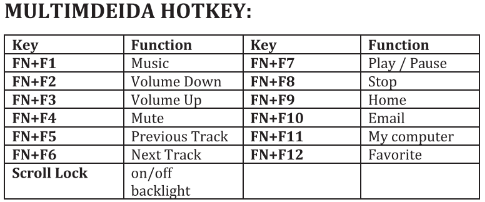
Press the Scroll Lock key to switch the backlight on or off on the Laser Gaming Full Size Gaming Keyboard with RGB Backlight.
If you want to turn the lighting off, press Scroll Lock. Press it again to turn the lighting back on.
Was this article helpful?
That’s Great!
Thank you for your feedback
Sorry! We couldn't be helpful
Thank you for your feedback
Feedback sent
We appreciate your effort and will try to fix the article