Description: How to connect a device and check that charging has started.
Question: How do I charge a device with the power bank?
Answer:
Model reference: PB-10SSBK-889 (Black)
Applies to: PB-10SSBK-889 (Black), PB-10SSRP-824 (Dark Cherry), PB-10SSGY-800 (Grey), PB-10SSDB-817 (Galactica)
If your SKU differs, search our support page by your Model SKU to find the correct article.
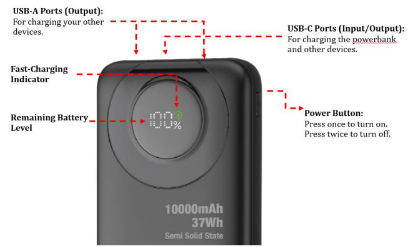
Connect your compatible device to a USB-C or USB-A output on the ChargeCore Semi Solid State PD20W 10K Power Bank using a suitable cable. Charging begins when the device is connected. A fast charging indicator appears on the display when fast charging is active.
Was this article helpful?
That’s Great!
Thank you for your feedback
Sorry! We couldn't be helpful
Thank you for your feedback
Feedback sent
We appreciate your effort and will try to fix the article