Question: How do I charge and set up my Laser Compact Digital Camera?
Answer:
Model reference: CA-DC26BK-506
Applies to: CA-DC26BK-506
If your SKU differs, search our support page by your Model SKU to find the correct article.
Follow these steps before using the camera for the first time:
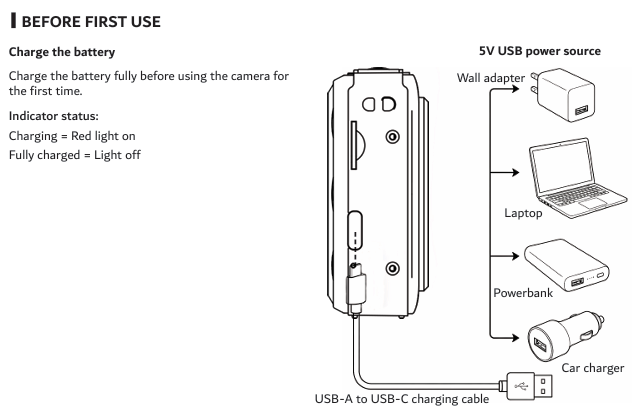
1. Connect the included USB-A to USB-C cable to the camera.
2. Connect the USB-A end to a 5V DC USB power source.
3. Charge the battery fully before first use.
4. The red indicator light remains on while charging.
5. The indicator light turns off when charging is complete.
6. Disconnect the charging cable when charging has finished.
7. Press and hold the Power button for approximately 3 seconds to turn the camera on.
8. Press the Mode button until System Settings appears.
9. Select Date/Time, set the year, month, day and time, then press OK to save.
These setup instructions apply to the Laser Compact Digital Still Camera - Black. Keep the camera below 40 degrees Celsius and away from water, heat, flames and direct sunlight.
Was this article helpful?
That’s Great!
Thank you for your feedback
Sorry! We couldn't be helpful
Thank you for your feedback
Feedback sent
We appreciate your effort and will try to fix the article