Question: How do I view, play or manage files on my Laser Digital Camcorder?
Answer:
Model reference: CA-CC26BK-513
Applies to: CA-CC26BK-513
If your SKU differs, search our support page by your Model SKU to find the correct article.
Use Playback Mode on the Laser Digital 1080p Camcorder with 16x Zoom - Black to review and manage stored files:
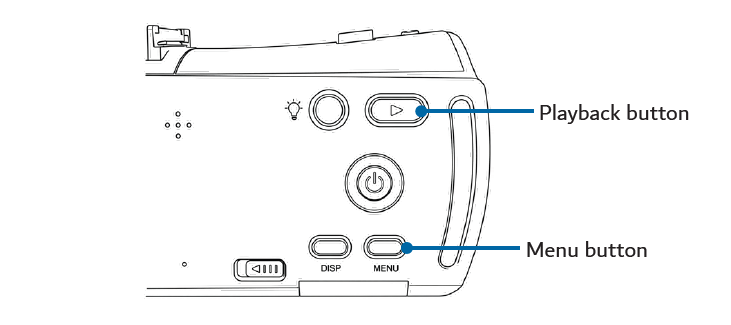
1. Press the Playback button.
2. Use the Up and Down direction buttons to browse photos and videos.
3. To play a selected video, press the OK button.
4. To manage a selected file, press the Menu button.
5. Choose Delete, Delete All, Lock or Unlock as required.
6. Press the Menu button again to exit.
Use Delete All carefully because it applies to all relevant stored files.
Was this article helpful?
That’s Great!
Thank you for your feedback
Sorry! We couldn't be helpful
Thank you for your feedback
Feedback sent
We appreciate your effort and will try to fix the article